1. Getting Started
Welcome to the Dreeemwave Bassliner manual! Here's how to get set up and start making music in seconds.
1.1 Activation
When you first open Bassliner in your DAW, a License Settings window will appear. To activate the plugin, simply enter two things:
- The email address you used during purchase.
- Your unique License Key, which was sent to that same email.
Once activated, your access to bassline generation is unlocked.
1.2 Your First Bassline in 60 Seconds
Eager to dive in? Here are two paths to start creating:
- Method 1: Drag & Drop
- Press the big
GENERATEbutton to create a new bassline in the piano roll. Then, drag the MIDI directly from Bassliner onto your favorite synth or sampler track. As easy as that! - Method 2: MIDI Routing
- For a faster workflow, route Bassliner's MIDI output to another instrument. Place Bassliner on one track and your chosen synth on another. Set the synth track's MIDI input to receive from the Bassliner plugin. Now, just press play in your DAW, and every bassline you generate will play through your instrument instantly. (Consult your DAW's manual for specific MIDI routing instructions.)
Quick Tip: Always audition basslines with a kick drum loop playing. The rhythm of the kick dramatically influences how you perceive the groove of the bassline.
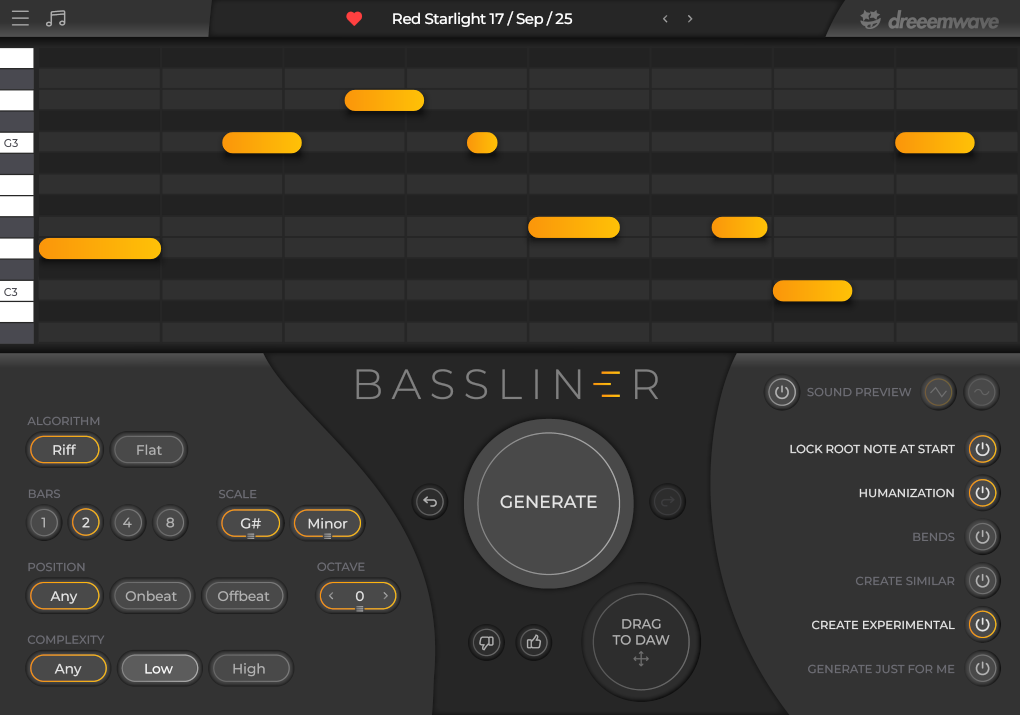
The Bassliner interface, for your easy reference.
2. The Interface
This section explains the non-generative components of the Bassliner user interface.
2.1 Top Bar: Navigation & Info
- Menu Icon (☰)
- Access the "about" section, your license settings and this manual.
- Music Icon (♫)
- Discover music made by Dreeemwave and other Bassliner users. Send us tracks you made with Bassliner for a chance to be featured in our upcoming playlists!
- Dreeemwave Logo
- A quick link to Dreeemwave's Instagram profile. Come say hi!
2.2 The Piano Roll
This is where your basslines take shape. The piano roll is fully interactive, allowing you to sculpt the MIDI to perfection.
- Create Note: Double-click in an empty space to add a new 8th note.
- Delete Note: Right-click on any note to remove it.
- Resize Note: Click and drag the right edge of a note to change its duration.
- Move Note: Click and drag the body of a note to move it around the grid. All movements automatically snap to a 16th-note grid. Hold
Ctrl(⌘on Mac) before the click, to make sure the note will be moved regardless of where it was clicked. - Nudge (Unquantized): Hold the
Altkey before moving or resizing a note, to disable grid snapping for precise placement. - Lock Zone: Right-click in an empty area to create a semi-transparent yellow lock zone. Click and drag to fill larger areas. Locked notes stay untouched when you press
GENERATE. Right-click on a locked zone to unlock it, or pressESCto clear all locks. Try combining this withCreate Similarto keep a rhythm while developing new pitches step-by-step. - User Input Awareness: Drop a MIDI file to the Piano Roll and watch your file's notes populate it. Now, when you generate new patterns, they will be harmonically compatible with these notes. Drop chord progressions to get fitting basslines, or drop a melody in order to get harmonies. Input gets deleted when you press the round
Xbutton.
Pro tip! Generate a new pattern and drop it to a new track, then feed the pattern into Bassliner via the Drag-To-DAW button, and generate again with Create Similar. The most fun and easy way ever to instantly make both the riff and harmonies for your new track! Works great alongside Lock Zones.
2.3 Bassline Library
Found a pattern you love? Don't let it disappear! Click the Heart icon to save it to your personal library. A name will be automatically generated. Clicking the name reveals your entire collection of "hearted" basslines, sortable by Name, Bars, Scale, or Date. This is your secret weapon for starting new tracks when inspiration is low.
2.4 Sound Preview
While the main purpose of Bassliner is to generate MIDI, you can quickly audition patterns using the built-in synth. Use the power button in the 'Sound Preview' section to enable it and choose between a saw or sine wave. You can even play your MIDI keyboard through it like a simple synth!
3. The Generator Engine: Your Creative Partner
This is where you guide the generation engine. Dial in your desired parameters, and let Bassliner craft the perfect pattern.
3.1 Core Parameters (Left Column)
- Algorithm (Riff / Flat)
- Choose
Rifffor classic melodic patterns with pitch variation orFlatfor driving, single-pitch basslines ideal for heavier styles. - Bars
- Set the length. 1-2 bars for catchy earworms, 4-8 bars for more adventurous and evolving phrases.
- Key & Mode
- Select the root note and choose between the musical modes of Minor, Major and Phrygian Dominant (a Dreeemwave favorite!).
- Position
Onbeatcreates prominent basslines that hit the strong beats.Offbeatgenerates bouncy grooves that leave space for your kick drum.- Complexity
- Need a simple, driving line? Choose
Low. Want a busy, technical one? Go forHigh.Anygives you the full range of possibilities.
3.2 Command Center (Middle Column)
- Undo / Redo Arrow Buttons
- Step backward or forward through your recent actions, including generations and note edits.
- GENERATE Button
- The heart of Bassliner. Press it and watch a new, unique bassline materialize, crafted to your specifications.
- Feedback Thumb Buttons
- Love or dislike a pattern? Let us know! Your feedback directly helps us improve the algorithms for everyone.
3.3 Advanced Refinements (Right Column)
- Lock Root Note At Start
- Ensure your bassline always begins on its root note for a harmonically solid start.
- Humanization
- Introduces subtle, non-quantized timing variations for a more natural feel.
- Bends
- A dynamic tool for expression. This enables automatic, intelligent pitch bends (portamento) for basslines that are meant to be the center of attention.
- Create Similar
- Liked the last pattern but want to try a variation of it? Turn this on before generating to get a new bassline inspired by the previous one.
- Create Experimental
- Engages newer, more adventurous algorithms. The results may be less predictable but can lead to unique ideas. You might discover the next evolution of Bassliner here!
- Just For You
- When enabled, every pattern you generate is unique to you and will never be shared. When disabled, you may receive popular basslines that other producers have rated highly. While those won't be unique to you, they're proven, high-quality basslines.
3.4 Offline Mode
If you are offline or your computer is unable to communicate with our cloud generator server, Bassliner will seamlessly transition to its built-in offline algorithms. This ensures you can keep generating patterns without interruption. When this occurs, a red OFFLINE MODE notification will appear directly above the ALGORITHM label.
During offline mode, most parameters are unavailable and their respective controls will be greyed out. However, all workflow features like Lock Zones, User Input Awareness, and all remaining Piano Roll controls stay fully active to help guide your musical ideas.
To quit offline mode, click on the red OFFLINE MODE notification.
4. Pro-Tip: Beyond Bass
Don't let the name trick you. Bassliner is a fantastic tool for generating melodic riffs for any instrument. Try using it to create lead lines, pluck melodies, or other melodic parts for your tracks. We hope you will agree once you try this!
5. Support
For questions, feature requests, or anything else, you can reach out to Dreeemwave by email at [email protected] or on Instagram @dreeemwave.
Have fun!